Compiler Architecture Explained
The Glu compiler is a multi-stage compiler that compiles Glu source code into an executable file. The compiler is written in C++ and uses the LLVM compiler infrastructure to generate machine code. The compiler consists of several stages, each of which performs a specific task in the compilation process.
The particularity of the Glu compiler is that it can import LLVM IR. This means that the compiler can generate a Glu interface from the LLVM IR representation of a program.
Compiler Stages
The Glu compiler has multiple stages, each of which performs a specific task in the compilation process. The stages are shown on this diagram:
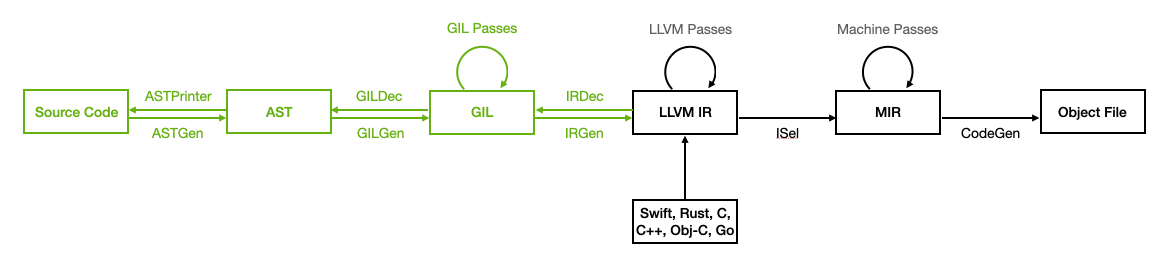
The code goes through the following representations during the compilation process:
- Glu Source Code: The original source code written in the Glu programming language (
.glufiles). - AST: The abstract syntax tree representation of the program.
- GIL: The Glu Intermediate Language, an intermediate representation of the program that is used for high-level optimization and analysis (
.gilfiles). - LLVM IR: The intermediate representation of the program in the LLVM compiler infrastructure (
.llfiles for textual representation,.bcfiles for binary representation). - MIR: The LLVM Machine IR, the final representation of the program that is used to generate machine code.
- Object File: The compiled machine code in an object file format (
.oon Unix-like systems,.objon Windows).
The Glu compilation process consists of the following stages:
- ASTGen:
Glu Source Code -> AST: The ASTGen stage parses the Glu source code and generates an abstract syntax tree (AST) representation of the program. - GILGen:
AST -> GIL: The GILGen stage lowers the AST representation of the program to the Glu Intermediate Language (GIL) representation. - GILOptimizer:
GIL -> GIL: The GIL representation of the program is optimized using high-level optimizations. - IRGen:
GIL -> LLVM IR: The IRGen stage generates the LLVM IR representation of the program from the GIL representation.
The LLVM infrastructure is used to optimize and generate machine code from the LLVM IR representation of the program, leveraging the powerful optimization passes and code generation capabilities of LLVM.
The Glu import process allows importing foreign functions and types from different kinds of input files:
- IRDec:
LLVM IR -> AST: The IRDec stage generates AST nodes for function declarations and types from the LLVM IR representation. - ClangImporter:
C Header Files -> AST: The ClangImporter stage uses Clang tooling to parse C header files and generate AST nodes for function declarations and types. - ASTPrinter:
AST -> Glu Source Code: The AST Code Printer stage pretty prints Glu source code from the AST representation of the program (-print-interface).
The Glu compiler can also automatically call the appropriate compilers to import different supported languages, and link imported functions and types into the final executable during the compilation process. See Supported File Formats for more information on supported input formats.
The Glu compiler is designed to be modular and extensible, allowing developers to easily add optimization passes to the compilation process. Each stage implemented as a separate C++ library.
Debug Information
The Glu compiler keeps track of debug information throughout the compilation process to provide accurate source-level debugging information in the generated machine code. The compiler generates debug information in the LLVM IR representation of the program, which is used by the LLVM infrastructure to generate debug information in the final machine code. Debug information includes source file names, line numbers, and variable names, allowing developers to debug their programs using debuggers such as LLDB.
We believe that debugging is important, both without and with optimizations. Therefore, the Glu compiler generates debug information by default, even when optimizations are enabled. This allows developers to debug optimized code as accurately as possible.
Debug information such as variables and their types is very important in the importing process, as it allows the compiler to access all types and function names from the LLVM IR representation of the program. Without debug information, some types might not have their correct names, and struct content might not be accurate. Therefore, when importing LLVM bitcode generated by other compilers, it is highly recommended to enable generation of debug information in those compilers.
Example Compilation
To compile a Glu program, you can use the gluc compiler, which is the front-end of the Glu compiler. The gluc compiler takes Glu source code as input and generates the requested output, such as LLVM bitcode or an executable file.
We will use the following Glu program as an example:
1
2
3
4
func main() {
    let message: String = "Hello, World!";
    std::print(message);
}
To view the first stage of the compilation process, you can generate the AST representation of the program using the -print-ast flag:
1
gluc -print-ast main.glu
This will output the AST representation of the program in a Human-readable format. You can inspect the AST to understand how the Glu compiler represents the program internally.
You can then look at the GIL representation of the program using the -print-gil flag. Use the -o flag to specify the output file, or leave it out to print to standard output:
1
gluc -print-gil main.glu
This will output the GIL representation of the program in a textual format. You can inspect the GIL to understand how the Glu compiler lowers the AST representation of the program to the GIL representation. By default, colors are used to highlight different parts of the GIL representation when printed to a terminal that supports colors. You can disable colors using the --color=0 flag.
It should look like this:
1
2
3
4
5
6
7
8
9
10
11
gil @main : $() -> Int32 {
entry:
    %0 = alloca $String, loc "main.glu":2:9
    debug %0 : $*String, let "message", loc "main.glu":2:9
    %1 = string_literal $String, "Hello, World!", loc "main.glu":2:27
    store [init] %1 : $String, %0 : $*String, loc "main.glu":2:9
    %2 = load [take] %0 : $*String, loc "main.glu":3:16
    call @print, %2 : $String, loc "main.glu":3:15
    %3 = integer_literal $Int32, 0
    return %3 : $Int32, loc "main.glu":1:13
}
You can then generate the LLVM IR representation of the program using the -print-llvm-ir flag:
1
2
gluc -print-llvm-ir main.glu -o main.ll
less main.ll
This will output the LLVM IR representation of the program in a textual format. It can be quite verbose, but you can inspect the LLVM IR to understand how the Glu compiler generates LLVM IR from the GIL representation of the program.
Note that more intermediate compilation stages are available, such as printing the AST before semantic analysis (-print-astgen), printing the GIL before optimizations (-print-gilgen), and printing GIL between optimization passes. More flags are available; see gluc --help for a full list.
Import Interface
You can then transform the LLVM IR back to an AST with function declarations only, using the -print-ast flag on the LLVM IR file:
1
gluc -print-ast main.ll
Because the input is LLVM IR, the compiler will go through the IRDec stage to generate an interface for the program.
To view the interface as code, use the -print-interface flag:
1
gluc -print-interface main.ll
This will go through the IRDec, and ASTPrinter stages to generate a human-readable Glu interface file from the LLVM IR representation of the program. You can inspect it to understand how the Glu compiler generates Glu interfaces from an LLVM IR representation of a program.
Decompiling LLVM IR from Other Compilers
Remember that you can also decompile LLVM IR generated by other compilers back to Glu interfaces using the Glu compiler. This can be useful for integrating Glu code with code generated by other compilers.
For example, a similar C program compiled with Clang:
1
2
3
4
5
6
7
#include <stdio.h>

int main() {
    char const *message = "Hello, World!";
    puts(message);
    return 0;
}
Can be compiled with Clang to LLVM bitcode:
1
clang -g -c -emit-llvm main.c -o main.bc
And then decompiled back to Glu source code:
1
gluc -print-interface main.bc
This should generate a Glu interface similar to the original Glu program, with just a single main function in this example.